Office workers report an average of 3.6 technology interruptions and 2.7 mandatory security-update disruptions every month, according to Ivanti's 2025 Digital Employee Experience Report — friction that compounds quietly across the business.
A comprehensive IT infrastructure assessment cuts through that fog. It builds an evidence-based picture of what you have, how well it supports operations, where risk hides, and what deserves attention first. This guide covers the seven core infrastructure components, how to run an assessment, what to do with the findings, and when it makes sense to bring in outside help.
Key Takeaways
- A strong assessment ties technology performance and risk to business goals, not a static inventory.
- Complete coverage spans hardware, network, applications, data, security, users, and governance or contracts.
- The best deliverable is a prioritized roadmap that separates urgent risk from nice-to-have upgrades.
- Independent guidance makes it easier to compare providers and options before a major renewal or purchase.
What Is a Comprehensive IT Infrastructure Assessment?
A comprehensive IT infrastructure assessment is a structured review of the technology, systems, providers, processes, and controls that keep your organization running day to day. It diagnoses how your environment performs against what your business actually needs.
Assessment vs. Audit: Not the Same Thing
People use these terms interchangeably, but they answer different questions. NIST defines an assessment as an evidence-based evaluation of characteristics, effectiveness, and capabilities. That evaluation is generally informational and built to support decisions.
An audit is different: it is an independent review that tests compliance against a defined policy, framework, or contractual requirement.
- An assessment asks: How well does this work, what's the risk, and what should change?
- An audit asks: Does this meet a defined standard, and can we prove it?
A well-run assessment often draws on similar evidence, including documentation, interviews, technical review, and gap analysis. Its purpose is strategy and decision support, not certification.

The Questions It Should Answer
- What do we actually have?
- What's working, and what isn't?
- Where is risk or friction hiding?
- What are we paying for, and is it still worth it?
- What needs to change first?
- Can this environment support where we're headed?
Scoping It to Your Organization
Scope should flex to fit your situation. A single-site business with a stable stack needs a lighter review. A multi-location organization with overlapping providers, an approaching renewal, a recent security scare, or a lean IT team stretched too thin needs more depth.
What Are the 7 Components of IT Infrastructure?
These seven areas interconnect. A weak spot in one rarely stays contained. An aging switch degrades network performance, which slows applications, which frustrates users, which lands as a support ticket nobody traces back to the real cause.
Hardware and Physical Infrastructure
This is everything with a plug or a battery: servers, workstations, laptops, mobile devices, printers, storage, networking gear, wireless access points, and the cabling and power behind it all.
For each asset, record:
- Owner, location, and age
- Warranty and support status
- Utilization and lifecycle stage
- Replacement dependencies (what breaks if this goes down)
Age alone isn't the deciding factor — a manufacturer's specific end-of-support date matters more than a blanket "replace every X years" rule, since support timelines vary by model and vendor.
Network and Connectivity
Review internet access, WAN links, LAN design, wireless coverage, bandwidth, segmentation, redundancy, remote access, and firewall configuration. Then check whether your diagrams still reflect reality — most don't after a year or two of changes.
Look specifically for:
- Single points of failure (one switch, one link, one path)
- Performance complaints that never got root-caused
- Gaps between documented configuration and what's actually deployed
Software, Cloud, and Applications
Build a full inventory: business-critical platforms, SaaS tools, operating systems, integrations, versions, owners, renewal dates, and license counts.
Software sprawl is common and expensive. In Flexera's 2025 global survey of 506 IT professionals, 35% reported that wasted SaaS spend increased over the prior year. That doesn't mean over a third of your licenses sit unused, but it's a strong signal to reconcile what you're paying for against what people actually use.

Flag:
- Duplicate tools
- Unsupported software
- Unsanctioned apps
- Manual workarounds caused by systems that don't integrate
Data, Storage, Backup, and Recovery
Document what data you hold, where it lives, who can access it, and which systems depend on it. Then test the parts most organizations assume are fine.
- Recovery Time Objective (RTO): how long a system can stay down before the business takes real damage
- Recovery Point Objective (RPO): how much data loss you can tolerate
A backup job completing successfully is not the same as a tested recovery. Require evidence of an actual restore test, not just a green checkmark on a backup dashboard.
Cybersecurity and Access Controls
Cover identity and access management, privileged accounts, multifactor authentication, endpoint protection, patching, email security, logging, and incident response readiness.
Don't stop at the obvious accounts. Check for:
- Third-party and vendor access that's still active
- Former-employee accounts nobody deactivated
- Unmanaged personal or IoT devices connected to the network
- Shadow IT tools finance or marketing adopted without IT's knowledge
Map findings against whatever your organization actually has to meet — a cyber insurance questionnaire, a client contract, or an industry framework — rather than assuming one generic checklist covers every requirement.
End-User Technology and User Experience
Talk to the people using the systems every day. Employees, managers, customer-facing staff, and IT itself all notice different friction points: slow systems, clunky applications, repetitive manual work, and support delays that never quite get resolved.
The interruption data cited earlier isn't abstract. Multiply a few interruptions per person, per month, across a 200-person organization, and the productivity drain adds up fast. Compare what users report against actual performance data and ticket history, so recommendations fix root causes instead of quieting the loudest complaint.
Governance, Providers, Contracts, and Operating Processes
This is the layer most assessments skip, and it's often where the money hides. Review IT ownership, change management, vendor management, service-level agreements, and documentation practices. Then dig into contracts: renewal dates, pricing models, license commitments, and whether current vendors still fit.
A real example: one multi-location organization with more than 250 remote sales employees uncovered roughly $8,000 a month in unnecessary Microsoft licensing costs. That gap only surfaced once someone reviewed the licensing actually in place.

How to Conduct an IT Infrastructure Assessment
A useful assessment follows a fixed sequence tied to business priorities. Work the steps in order so findings stay actionable instead of turning into a generic technology checklist.
Define the Assessment Objective and Scope
Start with the business driver: growth, cost control, security, a contract renewal, or a modernization push. Set boundaries around locations, systems, and time period. Name who needs to be involved, from executive sponsors to end users.
Build the Current-State Inventory
Pull the records that describe the environment today:
- Asset lists and network diagrams
- Application inventories, contracts, and invoices
- Support tickets and known workarounds
Validate those records through interviews and walkthroughs. Documentation drifts from reality faster than most teams realize, so mark every assumption clearly before you judge performance or risk.
Evaluate Performance, Risk, and Business Fit
Measure what you can:
- Uptime and capacity headroom
- Ticket trends and backup results
- Patch status and license usage
Compare that picture to real business requirements and growth plans. Stakeholder interviews usually surface friction that never shows up in a spreadsheet.
Review Costs, Providers, and Technology Dependencies
Add up direct and indirect spend: hardware, software, cloud, support, internal labor, and downtime. Flag overlapping providers, unclear ownership, and contracts with awkward renewal timing or terms that box you in.
Validate Security, Continuity, and Resilience
Test whether documented controls actually run day to day: MFA coverage, patching, backup monitoring, and restore procedures. Map single points of failure across connectivity, power, applications, and people. If the one person who knows the network left tomorrow, what breaks first?
Produce an Evidence-Based Assessment Report
Package the work so leaders can decide, not just review:
- Executive summary in plain business language
- Validated inventory and current-state diagrams
- Key risks, cost observations, and a prioritized roadmap
Separate confirmed findings from assumptions and open questions. Assign a business owner to every significant issue so the roadmap has accountability after the report is delivered.

What Should You Do With Assessment Findings?
Categorize by Business Impact and Urgency
Sort findings into four tiers:
- Critical — active risk to operations or security
- Near-term — address inside the current planning window
- Planned — scheduled work with defined owners and budget
- Informational — watch items that do not need action yet
Rank each finding by operational impact, security exposure, and remediation effort. Separate quick wins from work that needs budget, procurement, or migration planning.
Turn Gaps Into Decisions and Options
For each major finding, document the issue, business consequence, likely root cause, and realistic options—not a single predetermined answer. Compare choices on:
- Capability fit
- Scalability
- Total cost of ownership
- Contract flexibility
Avoid presenting one preferred vendor as the only path forward. A requirements-first approach with apples-to-apples proposal comparison produces a better outcome.
Build a Sequenced Remediation Roadmap
Organize work into phases:
- Immediate risk treatment: issues that could disrupt operations this quarter
- Short-term improvements: fixes that fit the current budget cycle
- Planned modernization: larger projects that need lead time
- Longer-term strategic initiatives: work tied to growth or transformation
Map dependencies between phases. Identity fixes usually need to happen before application changes. Network readiness needs to precede a cloud or communications rollout.
Establish Ongoing Measurement and Review
Treat assessment as a recurring control, not a one-time report. Assign owners and track a short set of indicators:
- Availability
- Patch compliance
- Recovery readiness
- User experience
- Provider performance
Reassess after major changes: an acquisition, a security event, a provider switch, or ahead of a significant renewal.
When Should You Use an Independent Assessment Partner?
Internal teams can often handle this alone when the environment is well documented, the scope is narrow, and the right expertise already sits in-house.
Independent help earns its keep when:
- Documentation is incomplete or out of date
- Multiple providers are involved and nobody owns the full picture
- A major renewal or replacement decision is approaching
- Internal resources are stretched thin
- Stakeholders disagree on the path forward
- You need market context before committing to a solution
When picking a partner, look for:
- Business-first discovery, not a product pitch disguised as an assessment
- Vendor neutrality and a transparent methodology
- Willingness to compare multiple options rather than push one
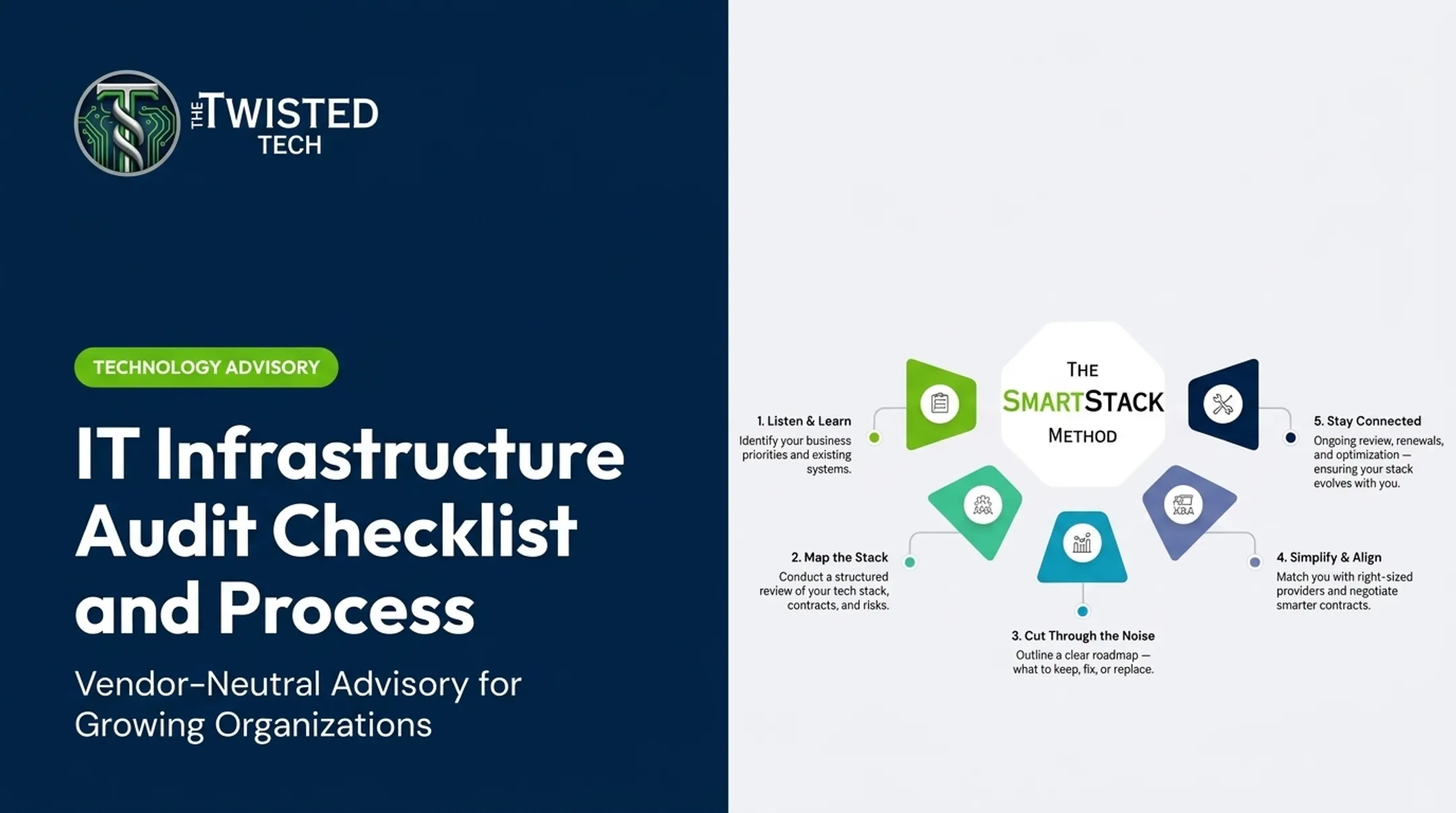
This is the model The Twisted Tech built its advisory work around. Founder Ryan Hanson developed the SmartStack approach because organizations kept landing technology decisions shaped more by whoever sold the loudest than by their own requirements.
SmartStack moves through five steps:
- Listen & Learn
- Map the Stack
- Cut Through the Noise
- Simplify & Align
- Stay Connected
The firm doesn't sell hardware, software, or connectivity. It helps growing, customer-focused organizations develop requirements, evaluate providers, compare proposals, negotiate terms, and coordinate implementation so leaders can make an informed decision.
Frequently Asked Questions
What are the 7 components of an IT infrastructure?
Hardware and physical infrastructure, network and connectivity, software and cloud applications, data and backup, cybersecurity and access controls, end-user technology, and governance or operating processes. Weaknesses in one area typically show up as problems in another.
What are examples of IT infrastructure?
Examples include servers, laptops, and networking equipment; internet and WAN connections; cloud platforms and business applications; storage and backup systems; security tools like firewalls and MFA; and the contracts and processes that govern them all.
What is an IT infrastructure audit?
An audit tests your environment against a defined policy, control framework, or contractual requirement, and produces a compliance judgment. An assessment is broader: it evaluates condition, risk, business fit, and future readiness without claiming compliance certification.
How often should an organization conduct an IT infrastructure assessment?
Timing depends on organizational change, risk level, and complexity. There's no universal schedule. Reassess after major changes like acquisitions, security incidents, or provider switches. Always reassess before a significant renewal or investment decision.
What should be included in an IT infrastructure assessment report?
An executive summary, a validated current-state inventory, network diagrams, risk-rated findings, cost and lifecycle observations, comparative options with trade-offs, and a prioritized remediation roadmap leadership can act on.
Should an IT infrastructure assessment be done internally or by a third party?
Internal teams bring institutional knowledge; third parties bring objectivity and broader market exposure. For complex, multi-provider, or fragmented environments, a hybrid approach (internal input paired with independent review) often works best.